
At the beginning I was excited. But then, I realized it's just another photo editing & publishing app from Apple. Nothing more. Despite the cool effects feature, something is missing: the direct integration with iPhoto desktop library.
Let me share our story before we talk about iPhoto for iOS.
Here's the daily basis scenario using photos with our iPhone.
- Take photos.
- Retouch, effects etc then upload to Instagram etc.
- After 1000 photos, import all to iPhoto for Mac as the main master database of our photo library. Then delete all the 1000 photos in the iPhone so we'll get new fresh room for another new photos.
- Organize the photos in the iPhoto. Keyword, date, album, location, face, etc. And sometimes upload them to Flickr or else.
This is how we organize the ocean of our photos. Archived. Organized.
But sometimes, we want to take the pictures from the archive - the iPhoto Library database - to our mobile device, iPhone or iPad. There are options we always take:
- Create a specific album in iPhoto for Mac.
- Open iTunes, sync that album to iPhone/iPad.
- Open that album on iPhone/iPad & select photo.
or..
- Launch PhotoSync app on desktop.
- Drag the photo from iPhoto Library to the PhotoSync app
- Launch PhotoSync app on iPhone/iPad.
- Receive the photo.
Then last night, Apple announced that they have iPhoto for iOS. I was like.. THIS IS IT! FINALLY! The real iPhoto integration between Mac & iPhone! Seamlessly, wirelessly, iTunes-less integration! iPhoto desktop has iPhoto mobile agent!
I was wrong.
As I wrote before, apparently it's just another photo editing & publishing app from Apple.

Another mobile photo retouching app
I have Camera+, SnapSeed, PhotoForge2, 100Cameras, Plastic Bullet for tweaking the photos. They are all awesome. Do we need another photo editing app? It depends.
For me, the effects feature is fantastic, though a bit slow & sluggish on iPhone 4.

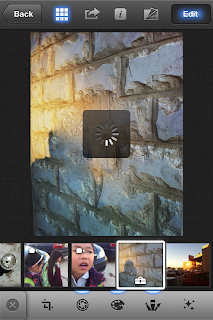

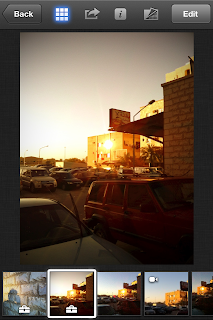
Edits in hi-res. Retrieve back the original photos. Save directly in Camera Roll Library or Albums.
But definitely, it's not a replacement for my SnapSeed & Camera+.
Journals
We had .mac photo library in the early 2000s. Then MobileMe Gallery. Now, iCloud Journals. Another online gallery from Apple but lack of many online features such as reshare or URL link for each photos just like MobileMe or .mac had.


Select photos from library & put them in Journals album. Put the photos with widgets: map, notes, weather, header as additional elements. What you edit here, sync directly to iCloud. Delete one journal in iPhone, deleted also on the iCloud. Keep in mind, by default, free iCloud only has 5GB space.
This is how it looks in the iCloud. Neat eh?
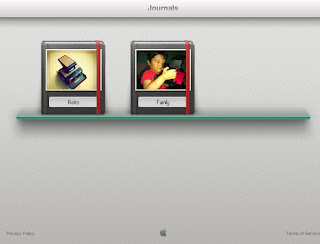

You can check my Journals here.
If you're an ex MobileMe user, this Journals is too basic compare to MobileMe Gallery. Remember how it looks & the features?
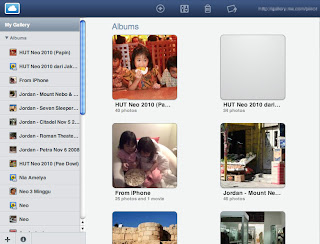
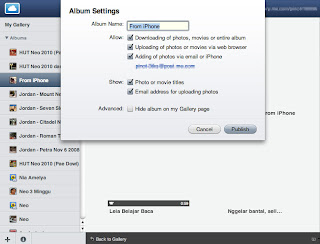
You can reshare, reupload, edit & sync directly from iPhoto for Mac. Maybe Apple have hidden plans for adding similar features on Journals in the future? We'll see.
Is it a must have app?
Again (and again) it's just another photo editing app. I was expect more, like the integration with iPhoto desktop. Journals feature, is what makes this app different with other photo editing apps. If you have an iCloud account, Journals is one good feature to add. Though it's not mature yet.
For me, the effects feature is fantastic, though a bit slow & sluggish on iPhone 4.


Edits in hi-res. Retrieve back the original photos. Save directly in Camera Roll Library or Albums.
But definitely, it's not a replacement for my SnapSeed & Camera+.
Journals
We had .mac photo library in the early 2000s. Then MobileMe Gallery. Now, iCloud Journals. Another online gallery from Apple but lack of many online features such as reshare or URL link for each photos just like MobileMe or .mac had.


Select photos from library & put them in Journals album. Put the photos with widgets: map, notes, weather, header as additional elements. What you edit here, sync directly to iCloud. Delete one journal in iPhone, deleted also on the iCloud. Keep in mind, by default, free iCloud only has 5GB space.
This is how it looks in the iCloud. Neat eh?

You can check my Journals here.
If you're an ex MobileMe user, this Journals is too basic compare to MobileMe Gallery. Remember how it looks & the features?


You can reshare, reupload, edit & sync directly from iPhoto for Mac. Maybe Apple have hidden plans for adding similar features on Journals in the future? We'll see.
Is it a must have app?
Again (and again) it's just another photo editing app. I was expect more, like the integration with iPhoto desktop. Journals feature, is what makes this app different with other photo editing apps. If you have an iCloud account, Journals is one good feature to add. Though it's not mature yet.


