Monday, January 23, 2012

Brosur Apple Macintosh 1984

Macintosh brochure 1984

Pada saat peluncuran Macintosh pertama di tahun 1984, Apple melakukan segala usaha untuk memperoleh perhatian semua lapisan orang dari pengguna komputer hingga ibu rumah tangga yang ogah pegang komputer. Salah satu usaha yang sangat gencar adalah pemasaran. Seperti brosur ini, membantu memperkenalkan semua orang pada Macintosh, komputer konsumer pertama dengan mouse dan graphical interface.

Dengan bertajuk "If you can point, you can use a Macintosh" brosur ini menggambarkan betapa mudahnya menggunakan komputer ini.


Macintosh brochure 1984

Dibandingkan dengan IBM PC dng DOS saat itu, tampilan Macintosh lebih intuitif & mudah dioperasikan. Pada brosur diperlihatkan bagaimana saat itu mengetik dengan WordStar di DOS & MacWrite di Macintosh. Apa yang diketik adalah apa yang diprint. What you see is what you get.

Bukan dengan ^Btag seperti ini^B.

Macintosh brochure 1984

Di brosur juga dijabarkan sekilas teknologi yang digunakan dengan bahasa sederhana & mudah dipahami awam. Seperti bagian penggunaan disket 3½ inch di Macintosh yang saat itu belum populer dibandingkan disket 5¼ inch "they are small enough to fit in a shirt pocket."

Kemudian juga digunakannya polyphonic sound generator yang bisa generate suara manusia dengan kualitas tinggi atau musik. Untuk awam, feature ini membukakan gagasan baru berkomputer: mereka bisa belajar bahasa asing atau membuat musik sederhana di rumah.


Macintosh brochure 1984

Selain geek dan tech nerd, siapa yang mengenal Bill Gates saat itu? Microsoft masih belum besar, tapi Steve Jobs merasa perlu menaruh dia dalam brosur ini sebagai gambaran bahwa Macintosh didukung developer-developer muda berbakat. Quote Bill Gated di brosur ini:
To create a new standard takes something that's not just a little bit different. It takes something that's really new, and captures people's imaginations. Macintosh meets that standard.

Brosur ini merupakan salah satu amunisi penting dalam launching Macintosh. Copy & layout dirancang sedemikian rupa, terlihat ramah & hangat. Para engineer yang membidani Macintosh pun disertakan, memperlihatkan bahwa Macintosh bukan sekedar komputer, tapi juga maha karya para engineer-nya.


Macintosh brochure 1984


"The engineers were finally finished, they introduced us to a personal computer so personable it can practically shake hands."

Thursday, December 29, 2011

Tuesday, December 27, 2011

Doodling Everywhere


What they love about MessagePad is they can draw with a stylus.
"I love painting with this pen than finger," she said.
Seems that we still need stylus, eh?

Sunday, December 25, 2011

Playing With Newton MessagePad


What can you do with an old MessagePad? Painting! With NewtPaint software, 1-bit painting is fun, just like the old days of MacPaint or DrHalo. Our gallery here.

Tuesday, December 20, 2011

Newton dan Network


Setelah berhasil jajal serial-to-USB connection, sekarang mencoba koneksi LAN via AppleTalk, LocalTalk atau EtherTalk. Dan siapa tahu bisa mencoba berinternet.

Berhubung di pasar loak cuma nemu W-LAN card, ya sudah coba dulu dengan wireless network. Saat dicolok ke PCMCIA card, cuma punya LinkSys yang powernya menyala. Sayang responnya negatif: card tidak dikenal!

Browsing sana sini, dapat informasi buruk: Ethernet tidak disupport oleh MessagePad 130 dengan Newton OS 2.0 & Newton Internet Enabler 1.1. Ethernet hanya bisa digunakan di MessagePad 2000, 2100 & eMate 300 dengan Newton OS 2.1 & Newton Internet Enabler 2.0.

If you are looking for a way to get Ethernet connectivity for your Original MessagePad (OMP), MessagePad 100, MessagePad 110, MessagePad 120 or MessagePad 130, you are out of luck. Ethernet connectivity requires version 2.0 of the Newton Internet Enabler which, unfortunately, is only available for Newton OS 2.1
(dari PDA-Soft.de)

Tapi dari website ini, sepertinya ada satu wireless networking card yang dikenal oleh MessagePad 120 (tipe sebelum 130) tanpa driver, yaitu DaynaCOMM Roamer. Dan sudah pasti barang begini sangat amat langka.
I purchased the Roamer (a PC card wireless networking device) and a DaynaCOMM Network Access Point from e-bay a couple of months ago, but just today tried to getthem working. I have no trouble using a 2.0 MP120 with them, and seem toba able to access my home Apple Talk network wirelessly.
Menginstall driver Ethernet card juga tidak membantu. Padahal card LinkSys yang dibeli tercantum dalam daftar yg disupport oleh driver ini.

Bagaimana dengan LocalTalk? (updating...)

Newton di Jaman iOS


Pertanyaan saat menggenggam Newton MessagePad 130, seberapa jauh teknologi 1995 ini beradaptasi dengan jaman teknologi iOS & Lion?


Komunikasi

Newton MessagePad 130 ini menyediakan infrared, port serial DIN 8 & PCMCIA slot sebagai alternatif pertukaran data dengan device lain.

Mana yang paling mungkin dilakukan? Infrared? Untuk sementara diabaikan karena urusan protokol IrDA atau IrTalk lebih njelimet urusannya di teknologi jaman sekarang. Lagipula Lion sudah cerai dengan teknologi OS Classic (tidak bisa menjalankan software Classic kecuali menggunakan emulator seperti SheepShaver.)

Yang paling gampang sepertinya adalah serial. Karena protokol serial masih dipakai hingga kini & converter serial to USB bukan barang langka. Kebetulan Newton ini disertai kabel converter dari DIN 8 ke serial PC biasa (DB9 atau RS-232). Jadi tinggal colok Bafo converter DB9 ke USB untuk ke MacBook. Software Mac yg digunakan adalah Newton Connection for MacOS X (bukan dengan software official dari Apple karena sudah tidak bisa jalan di Lion. Lion hates classic, remember?)


Cara serial to USB ini berhasil. Dengan software NCX bisa sync, backup, restore, install software untuk Newton bahkan screen capture.

Berikutnya LAN. Jalan-jalan ke pasar loak, nemu beberapa PCMCIA card tua seharga Rp 12000-15000. Iseng coba di rumah, colok ke Newton. 1-2 card tidak ada tanda-tanda kehidupan, mungkin memang sudah mati. Kecuali satu yang dari LinkSys, ada respon! Sayangnya responnya negatif "Newton doesn't recognize this card!"
Saatnya berburu driver di internet! Lanjut lebih detail.


Software-software Newton

Ternyata masih tersedia banyak software-software pendukung untuk Newton tua ini. Satu tempat yang tepat adalah United Network of Newton Archives. Perlu diketahui, beberapa software di tempat ini sebagian besar adalah Classic software, artinya ngga bisa dibaca di Lion kecuali menggunakan emulator SheepShaver. Jadi, menyiapkan 'environment' Classic di Lion adalah keharusan jika mau ngoprek Newton.


Berinternet?


Masih buntu. Karena Newton OS 2.0 di MessagePad 130 ini hanya bisa menggunakan hardware tertentu untuk bisa berinternet dan hanya terbatas menggunakan dial-up & PPP protocol. Hardware yang dibutuhkan adalah Apple Newton Modem atau PCMCIA modem dng X-jack connector (colok dengan kabel telpon biasa).
Bagaimana dengan LAN atau ethernet? Atau wifi? Lanjut lebih detail.


Berdaya guna atau hanya pajangan?


4 batere ukuran AA masih ada 1/4 dari sejak barang dikirim penjual di Amerika sana tgl 29 November 2011 - total sudah hampir 1 bulan belum ganti batere! Dengan batere yang awet seperti ini, layak buat mencatat, menulis draft, corat coret di PDA ini tanpa kepikiran batere bakal habis. Dokumen & data yang dibuat bisa di-sync ke Mac atau diteruskan ke iDevices lain.

Atau buat eBook reader (dibutuhkan software converter) dengan layar yang cukup besar. Dibandingkan layar iPhone, Newton MessagePad 130 berlayar 320x240 monokrom cukup enak buat baca text berminggu-minggu tanpa ganti batere XD

Oh, bahkan bisa buat lihat-lihat photo, asal diconvert jadi file 1bit hitam putih seperti gambar iPhone 4 di MessagePad atas. Video juga bisa. Tentu saja video 1bit hitam putih juga. Retro ngga tanggung-tanggung!

Spec lengkap Newton MessagePad 130 bisa dilihat di sini.

Thursday, December 15, 2011

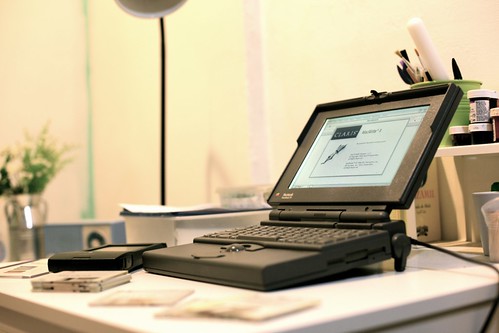
Finally! Newton MessagePad!

Been dreaming to get an Apple Newton MessagePad for years! From 1993!
Got it from eBay for less than $60. Floppy disks, cables, manuals, adaptors but no box.


I know it's a big late for playing with Newton. And it's a bit tough to get the supports in this iPad era. But still, it's fun! It's like having an old 1965 BMW R60 motorcycle.

I. Am. So. Excited!

Wednesday, December 14, 2011

Old Apple Brochures


Got these old brochures from eBay for US$6. Someday, it may worth thousand. But no, I will not selling them.

Tuesday, December 06, 2011

Got Our Wacom Inkling!


Finally, after days of shipping time & hours of Kuwait custom administration, we got our hand Wacom Inkling! Our complete doodles & sketches review here!

This is the first Wacom Inkling in Kuwait! #gapenting

Saturday, October 22, 2011

WIRED 1997: 101 Ways To Save Apple


I was reading my old June 1997 WIRED issue on Apple condition lately. Some interesting points from the 101 ways how to save Apple.


1. (point 7) Don't disappear from the retail chains. Rent space in a computer store, flood it with Apple products (especially software), staff it with Apple salespeople, and display everything like you're a living, breathing company and not a remote, dusty concept.

   Apple Store. Done.

2. (point 10) Get a great image campaign. Let's get some branding (or rebranding) going on. Reproduce the "1984" spot with a 1997 accent.

   Think Different.

3. (point 25) Portables, portables, portables. Pick the best-of-breed Wintel in each of the portable categories and then better it. Wintel has a fantastic range.

   iPhone, iPod touch, iPad.

4. (point 31) Build a PDA that less than $250 that actually does: cellular email, channel TV, internet phone.

   iPod touch?

5. (point 34) Port the OS to the Intel platform.

   Done in 2005.

6. (point 44) Continue your research on voice recognition.

   Siri?

7. (point 49) Bring back Andy Hertzfeld.

   Google has him.

8. (point 65) Roll out he Mac Plus again as a hip retro machine.

   iMac. Done. But it's not a retro machine.

9. (point 70) Simplify your PC product line.

   Mobile & desktop. Consumer & Pro. Done.


10. (point 92) With each new Mac, include a CD-ROM that explains the Apple family tree & future plans.

   No need. Steve's keynotes explain everything.

11. (point 101) Don't worry. You'll survive. It's Netscape we should really worry about.

   Netscape? How about Safari?

Read more in WIRED here.

Tuesday, October 18, 2011

The Apple band


The Apple band. Before they lost their vocalist.

Now the high resolution digital file (3500 x 3700 pixel 72dpi) is available for download with US$7.5 US$5
Buy Now

Wednesday, October 12, 2011

Breaking News on Oct 5 2011


Compiled from ABC News, Erin Burnett OutFront - CNN, Piers Morgan Tonight - CNN, CNET Loaded, Nightly News - NBC, The Kudlow Report - CNBC, The Rachel Maddow - MSNBC, Today.com - MSNBC, BBC Breakfast - BBC, Click - BBC.

Thursday, October 06, 2011

Steve Jobs As Cover Story


Been collecting magazines with Steve Jobs as cover story. Here are some of them. I have to digging more in the garage back in Jakarta for another issues.

Fortune - January 2000

BusinessWeek - February 2004

Fortune - February 2005

iCreate - April 2005

Fortune - February 2008

Fortune - November 2008

Fortune - November 2009

TIME - April 2010

Fast Company - July 2010

WIRED UK - July 2011

 Newsweek - September 2011