

Showing posts with label iPhone 4. Show all posts
Showing posts with label iPhone 4. Show all posts
Sunday, June 12, 2011
Zain Is Now iPhone Official Carrier


Tuesday, April 26, 2011
iPhone 4 Resmi Hadir di Kuwait
Akhirnya, ada juga operator lokal Kuwait yg mem-bundle paket resmi untuk iPhone. Kali ini adalah Viva dengan iPhone 4. Dengan paket yang relatif 'murah' untuk ukuran Kuwait, Viva menawarkan 3 jenis paket dengan kontrak 1 tahun.

Launchingnya pun kebetulan bersamaan dengan XL di Jakarta hari ini dengan paket lebih 'murah' dibanding Viva Kuwait :D

Buat perbandingan sekilas plan 3/premium iPhone 4 16GB:
Paling tidak, paket Viva ini masih lebih murah dibanding paket tidak resmi dari operator lain, Zain, di bulan Desember 2010 menawarkan promo iPhone 4 seharga Rp 4790000 :D

Launchingnya pun kebetulan bersamaan dengan XL di Jakarta hari ini dengan paket lebih 'murah' dibanding Viva Kuwait :D

Buat perbandingan sekilas plan 3/premium iPhone 4 16GB:
- Viva Kuwait: Rp 2100000 dengan bulanan Rp 780000, gratis telepon 1000 menit, data unlimited, SMS 300.
- XL Jakarta (belum termasuk pajak): Rp 999000 dengan bulanan Rp 599000, gratis telepon 600 menit, data 4GB, SMS 600.
Paling tidak, paket Viva ini masih lebih murah dibanding paket tidak resmi dari operator lain, Zain, di bulan Desember 2010 menawarkan promo iPhone 4 seharga Rp 4790000 :D
(crossposting dari sini)
Wednesday, April 20, 2011
Quick Review: Red Giant Movie Looks

The Process

There are 2 free categories with 8 effects in it: Quick & Essential. And 3 paid categories: Popular, Black & White and Blockbusters. Each $0.99.

Pick an effect to tweak the video look. There are only 2 simple slider: strength & brightness. Also an option for half & full resolution rendering.

A confirmation message before rendering with estimation time rendering. Sweet.

While it's rendering, there are some useful tips & information box to read for killing time.

When the iPhone receives an incoming call, the app suspends the rendering process. Then we can resume the process later. Awesome!
Problem is, this Suspend & Resume feature also occurs when we're inside the app & receive notification alert from other apps. Which is a bit annoying, since I have to resume manually everytime the notification appears.
"Stop mention me on Twitter, dude! I'm rendering!"
The Results
The effects are great. I usually get this kind of color on AfterEffects or Final Cut Pro. Now I can do 'Magic Bullet Looks' thingy on my iPhone.

Though there are some compressed blocky artefacts especially in the dark areas, this app definitely leads us to next mobile video era: mobile color-grading.
Before: Nexvio CinemaFX. Now: Red Giant Movie Looks. Next: Boris Continuum?
Useful links:
- iPhoneography
- Red Giant

Click to enlarge.
Though there are some compressed blocky artefacts especially in the dark areas, this app definitely leads us to next mobile video era: mobile color-grading.
Before: Nexvio CinemaFX. Now: Red Giant Movie Looks. Next: Boris Continuum?
Useful links:
- iPhoneography
- Red Giant
Monday, March 14, 2011

Monday, March 07, 2011
Is The iPhone 4 Ready For Video Post Processing?
It depends.
If you're doing it for fun, video-blogging, you may force the iPhone 4 to do video post-processing.
If you're doing it for pro, record on the iPhone 4 then edit it on desktop (yes you can put 'semi' word before 'pro' ^_^)
2 reasons.
1. It's a phone.
Its main function is a communication device. Rendering a video can take forever on this device & some apps are not natively multiprocessing. Anticipate a phone call while rendering. A phone call means interrupted rendering process. Not to mention the battery life. Don't try to render your edited video while far from electricity outlet. "Sorry I can't get your call, my phone is still rendering & the battery is low."

2. Quality matters.
1. It's a phone.
Its main function is a communication device. Rendering a video can take forever on this device & some apps are not natively multiprocessing. Anticipate a phone call while rendering. A phone call means interrupted rendering process. Not to mention the battery life. Don't try to render your edited video while far from electricity outlet. "Sorry I can't get your call, my phone is still rendering & the battery is low."

Takes 30 mins to render this 45 seconds video. 30 mins without receiving any phone call :D
And since it's a phone, you have to get used to edit in a small multitouch screen with your finger. iMovie for iPhone is great, but keep in mind that from desktop to tiny multitouch screen is another learning curve: finger editing.
Color-correction is a critical process in video post processing. Without proper compression method, the video file will be 'damaged' due to inappropriate lossy data compression algorithm.
For instance, CinemaFX for video is the coolest color-grading app for iPhone 4. Problem is, by default it compresses the video from the Camera Roll, means that you'll get a video with blocky compressed quality - not the original.
For instance, CinemaFX for video is the coolest color-grading app for iPhone 4. Problem is, by default it compresses the video from the Camera Roll, means that you'll get a video with blocky compressed quality - not the original.
Don't expect some Sorenson, DV-Pal or any professional video compression codecs for iOS anytime soon.
Try watch the video in HD to see the comparison.
Try watch the video in HD to see the comparison.
iMovie for iPhone on the other hand, is using H.264 compression, which is good enough for final video. But not good enough to do multiple post-procs.
Is it ready for video post-processing?
"Hello? I'm shooting a video right now with my iPhone. Can I call you back?"
Wednesday, July 07, 2010
iMovie for iPhone 4: Something is missing
iMovie for iPhone 4 is the ultimate weapon for vlogging. It's a powerful editing app in a tiny mobile device. But something essential is missing: Cut tool for clip splitting. Yes we can trimming the clip but it's a bit annoying to drag the trim 'handles' on the whole clip, especially when that one clip has multiple scenes & we want to remove the unnecessary scene.

IDEA: double tap the clip to reveals the trim 'handles' & cut 'handle'
Wish Apple will add this tool in the future update for iPhone 4 iMovie.

IDEA: double tap the clip to reveals the trim 'handles' & cut 'handle'
Wish Apple will add this tool in the future update for iPhone 4 iMovie.
Friday, July 02, 2010
A Moment with Finger Video Editing on iPhone 4
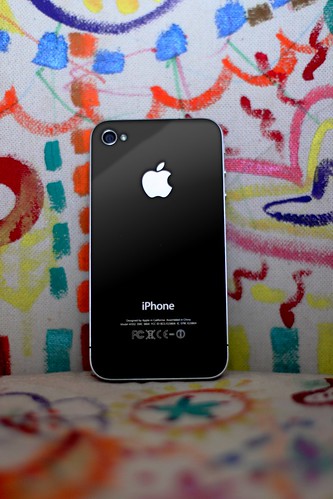
Seorang teman di sini memesan unlocked iPhone 4 dari UK. Setibanya di Kuwait, kami diberi kesempatan untuk mencicipi iPhone generasi ke-empat ini. Sekedar ingin tahu bagaimana rasanya melakukan kegiatan video, dari pengambilan gambar hingga editing.
Untuk pengambilan gambar, tap-to-focus sangat membantu untuk mendapatkan kesan shallow focus. Tidak ada yang istimewa selain itu.
Focused, unfocused
Namun begitu mencoba iMovie.app, sebuah pengalaman baru menyunting video dalam sebuah layar kecil. Tepatnya: menyunting video dengan jari telunjuk. UI & navigasi di dalamnya sangat touchable & bersahabat. Amazing, saya bisa scrubbing video dengan jari saya di dalam sebuah 'mesin editing' sekecil ini. This is true finger scrubbing for video editing. Finger editing!
Video di bawah diedit langsung di iMovie.app & di-export sebagai HD 720p (half-HD).
Wednesday, June 30, 2010

Subscribe to:
Posts (Atom)

