Showing posts with label iPad. Show all posts

Monday, June 13, 2011

Testing the iOS 5 beta 1

iPhone 4
Good news:

Posted using Mobypicture.com

Posted using Mobypicture.com

• "Connect to iTunes" still exist at the first setup. Even the MobileMe still exist in this pre-iCloud era.

• 'iPod' is gone. Now changed to Music app & Videos app.

• Green bubble chat: SMS. Blue bubble chat: iMessage.


• Yay! Free rotation editing in Photos.app.

Posted using Mobypicture.com

Posted using Mobypicture.com

• After created an iCloud account in the iPhone, it appears in Notes.app. And also in Contacts: All iCloud.

PhotoSync.app for iPhone crashes. The developer are working on a fix already. New update of PhotoSync 1.2 now working.


• Double click the home button for the camera icon in the lock screen.

• You can tweet your photo from Photos app without Twitter app installed. Though there's no sending-progress indicator so you won't know if it sent or failed.


• Notification Center doesn't interupt Nike+ GPS in indoor mode.

Bad news:

• iMessage cannot send video file. :-/

• Unprecission keypad. Tap "T" but typed "R" or "Y" instead.

• Video library is not accessible for other app, incl. Tumblr. (pic)

• Twitter, iMovie etc can access the video library but cannot process the file. (pic) If you want to share video, you can upload it from Photos.app > Share > Email. I can upload video file via email to twitvid. http://www.twitvid.com/CWZMP

• Ergonomically, using volume button as camera button is not convenient. The other fingers keep blocking the lens.
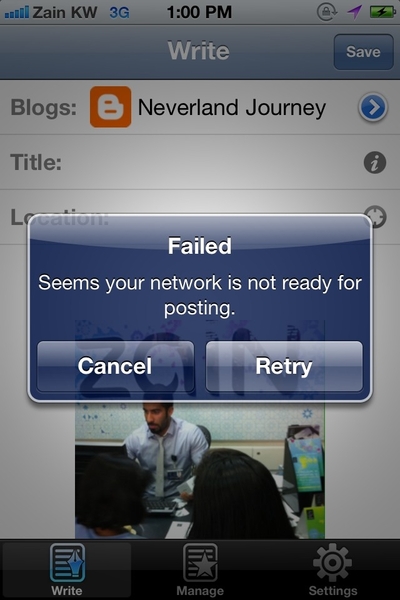


• BlogPress fails to upload blog.

Posted using Mobypicture.com

• iBooks is buggy.

• Photo Stream synced after more than 10 minutes. And not all the photos are streamed.

• Problem with email sharing from Photos.app. Takes forever to send for a 200kb photo.


iPad

• There's no Weather & Stock in Notifications setting.

• Home Sharing's podcast tab is missing in Videos.app. But I can watch video podcast shared from Home Sharing in Music.app, not in Videos.app.


• The Notification Center UI is too tiny for iPad. Waiting for the 'HD' interface.

Overall: there's no turning back to iOS 4! :)

(..updating)

Tuesday, April 19, 2011

Red Giant Invades iOS

Anyone who works with video post production service are familiar with Red Giant software. Their Magic Bullet Looks plug-in is amazing. Been using it on my FCP & AFX.

Anyway.
Now Red Giant releases apps for iPhone, iPod Touch & iPad. They just released 3 apps:


- Movie Looks: color grading app for video.


- Plastic Bullet: photography app with radical/extreme effects.


- Noir: photography app with dramatic black & white effects.

Haven't purchase the Movie Looks but there are some important points that I tweeted last night:
- Red Giant Movie Looks for iOS is available for $2.99.
- Suspend & resume to interrupt the render when take a phone call & return to where we left off. Nexvio CinemaFX's missing feature.
- The color are beautiful. Usually I can get this kind of color with Magic Bulllet Looks in FCP or AFX, but now on iPhone.
- Movie Looks does not yet support portrait movies.
- Movie Looks does not yet support more thant 120 seconds video.
- Though the color is great, you can see the 'damaged' artefacts on the jelly fish body.


Red Giant is here, time for proper color grading on iDevice?

note: none of these pictures & videos are mine

Friday, April 01, 2011

Video Review: Toca Tea Party


Kids are playing with Toca Tea Party. Suddenly the house becoming a picnic area!

Shot with Canon EOS 5D Mark II (lens 50mm ƒ1.4) & iPhone 4.
Edited on Final Cut Pro.
Music arranged on GarageBand for iPad.

Monday, March 21, 2011

The Falling Price of The Original iPad in Kuwait

Week ago Blink.com.kw was offering special prices for the original iPad (149KD for the 16GB WIFI).

Now, Sheeel.com has another special good deal: 119KD ($429) for 16GB WIFI plus bonuses.


It's cheaper than the US price back in 2010 when we bought ours. But only in a limited time & limited quantity.

More info in Mark's blog.

Monday, March 14, 2011

Finally, 2010 Price for Original iPad

Special offer from blink.com.kw

Finally, we can get a $499 (+ tax) price for original iPad. A one year too late? Maybe.
But keep in mind that Kuwait has no official business with Cupertino (nor Apple Middle East - AFAIK), so this last year official price is still considered as a good bargain in Kuwait.

I got the 16GB wifi model back in the US last year for $530 ($499 + tax). So now Kuwait can get the same price, 1 year later. Price-wise, shall I wait another one year for iPad 2? :D

Saturday, March 12, 2011

iMovie on Original iPad

When I heard that Apple finally release iMovie for iPad I was so freakin excited.
Then officially they ditch the compatibility for the original iPad. I was like... "NOOOOOOOOOOOO!" (doing Anakin's scream for Padme - btw our iPad name is iPadme Amidala.)

So why does Apple ditch the original iPad from iMovie's love?

Jason Snell (Macworld):
I was able to install my sample copy on an original iPad and it seemed to work fine, though as projects got more complex it got a little sluggish. This may be one of those cases where Apple decided that if the product didn't worth smoothly and flawlessly on the original iPad, it wasn't worth supporting at all. (article link)
Sluggish? Really?
Trying to download the iMovie app to the original iPad, this is what I got:


Front facing camera? Really?

iTunes & AppStores are refusing to install the iMovie to my original iPad. This is pure evil!
Then I got this trick. The iMovie finally installed in my original iPad.

After import some footages from iPhone 4, then I begin to edit a short video.
Is it sluggish? Is it good?
It. Is. Beautiful!


iPhone 4 > Camera Connection Kit > iMovie on original iPad


It's only 30 seconds project but at least everything works relatively fine. Not snappy quicky perfect but everything is there. The audio waveforms are there. The scrubbing footages are there. The smooth transitions are there.
And best of all - been doing finger-editing on iMovie for iPhone for months - now I'm doing finger-editing on 10 inch screen!
It. Is. Beautiful!


iMovie isn't built for a long duration/complex/multi layered video editing project. It's only for fun, family video, video-blogging, online video. I think the original iPad is sufficient enough for that kind of task.

So again, why do you ditch original iPad from iMovie's love, Apple?

Friday, March 11, 2011

iOS 4.3 Multitasking Gesture in My iPad


Here's how. Note: You need to register your iPad UDID to Apple developer program.


UPDATE:
Another way to activate the Multitasking Gesture here (Gizmodo).

Monday, March 07, 2011

Apple Without Jony Ive

Apple without Jony Ive?

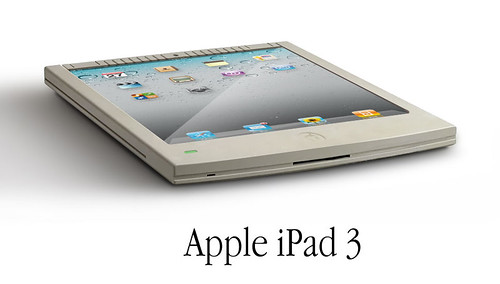
Without Jony Ive, the Apple design will return to the late 80s design? The Snow White design? (Photoshop-ed image)

Tuesday, March 01, 2011

Oleh-oleh Dari Yerba Buena Center

Tampak depan gedung YBCA San Fransisco beberes untuk iPad 2 launching tgl 2 Maret nanti.


UPDATE:
Di depan pintu masuk YBCA ada beberapa bendera warna warni berkibar. Masih ada hubungannya dengan 'colorful dots' di event Apple? Connecting the dots? Seperti yang selalu diucapkan Steve Jobs "Creativity is about connecting the dots"?
*spekulasi mode on*


Oleh-oleh dari @galihwismoyo (from Instagram)

Monday, December 20, 2010

Video Review: Teddy's Day

A children interactive book app for iPad from Auryn Inc: Teddy's Day

Friday, October 29, 2010

Vlogging with Canon 5D Mark II & iPad


iPad can be an ultimate vlogging tool. Though it has no camera, we can import videos from any device via iPad Camera Connection Kit, means you can get any video file from some devices including Canon 5D Mark II.


And it means, you can vlogging with DSLR quality videos. Not to mention the lens variations for the video. Problem is, the iPad can only read 640x480 video files from 5D Mark II. (you can import 1080p HD video but iPad Photos.app can't read them).

Importing
First thing first, you'll need Apple iPad Camera Connection Kit ($29). It comes with 2 connectors: SD card reader connector & USB connector. Since 5D Mark II comes with CF card, you'll need card reader & connect it to the USB connector. Or, connect the 5D Mark II directly to the USB connector.

The Photos.app will automatically launch & shows Camera page with the thumbnails from the camera. Select the 640x480 videos to import to 'All Imported' album.


Editing
Currently, there's only one video editing app for iPad: ReelDirector ($4.99).
Once the video files imported in the Photos.app library, we can access them in the ReelDirector.app & start to edit. For me, iPad 10 inch screen is decent enough to edit quick instant video.


Uploading
Finish editing, render & ready to upload. In ReelDirector you have 3 compression options. I'd prefer to use the 'High Quality Option' though it has bigger file size. Well, video from DSLR deserve that quality, right? Though, you'll need a 3G or better internet connection for that.

Enjoy the DSLR quality vlogging.

ps: with this process, I think I can call it a mobile-vlogging? Bulky mobile-vlogging? :D

Wednesday, April 21, 2010

When The Kids Met The iPad


"Young children think with their fingers. If they see something, they jab at it."

"iPad evaporated the abstract link between a child’s hand and the more abstract screen images, so no game controller or mouse is needed."

I read these article and tried to hand our kids the iPad. Yup, Warren Buckleitner was right. Our kids enjoyed the iPad within seconds. No hints, no instructions. iPad is the child's best friend :)

Hardware: Canon EOS 500D with 50mm ƒ1.4, MacMini
Software: FinalCut Pro with Magic Bullets Looks
Music: After School Snacks by Freeplay Music (World Chill Volume 13)